YI IoT APP Interface Introduction & How to Reset YI IoT Camera
YI IoT APP Interface Introduction
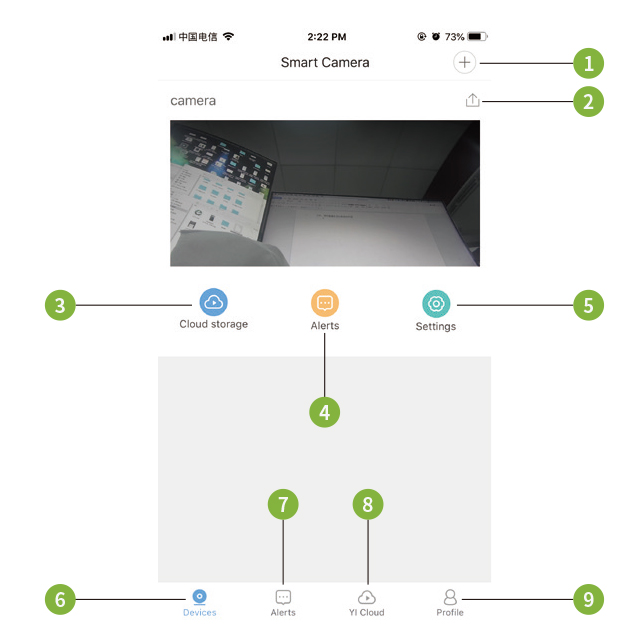
- Add camera
- Share camera
- Cloud storage
- Alarm
- Settings
- Devices
- Alarm message
- Cloud storage
- Account settings
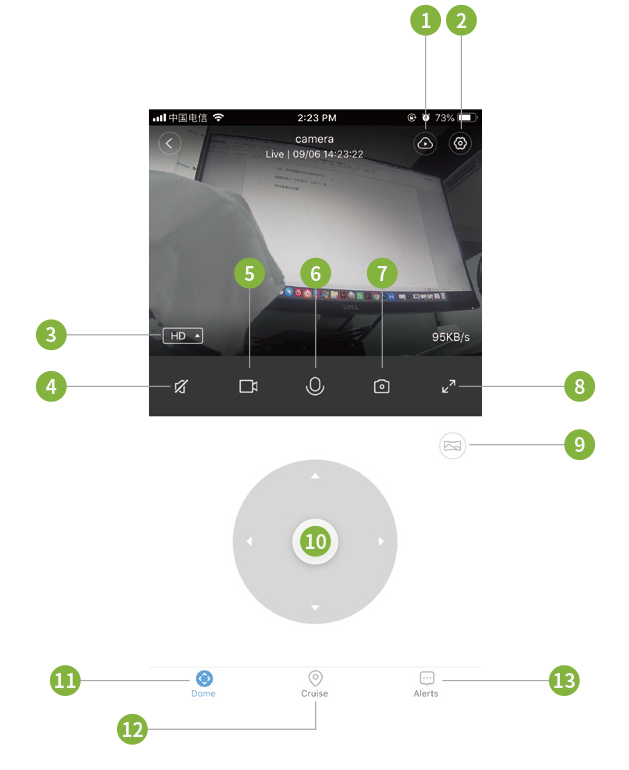
- Cloud storage
- settings
- Definition switching
- Sound
- Local video
- Voice
- Take photos
- Enlarge
- Panorama shooting
- Control Rotation
- Control Rotation
- Motion tracking
- Alarm message
How to Reset YI IoT Camera
Reset Button Press and hold Reset for about 5 seconds. When the horn sounds short voice, the reset is successful.
https://cameratechy.com/
Comments
Post a Comment